
Helpline (Mon–Sat) - 9279016839 (10:30 AM to 06:00 PM)
UdyamSewa Logo

TRUSTED BUSINESS REGISTRATION CONSULTANCY

Expert Assistance & Guidance for Udyam (MSME) & Others Business Registrations

We are private consultancy and not directly linked or associated with the Government in any form. Please Read our terms and conditions, privacy, refund & cancellation policy before applying. We are private consultancy and not directly linked or associated with the Government in any form. Please Read our terms and conditions, privacy, refund & cancellation policy before applying

* From 1st July, 2020 Onwards, Udyog Aadhar / MSME Registration is called as Udyam Registration
* 1 जुलाई 2020 के बाद से उद्योग आधार / एमएसएमई पंजीकरण को उद्यम पंजीकरण कहा जाता हैं।
Download & Print Udyam Registration Certificate Online 2026

Fill out the form to get assistance in downloading and printing your Udyam Registration Certificate with UdyamiSewa Experts

Download Udyam Registration Certificate Form

Udyam Registration Details / उद्यम पंजीकरण विवरण
Personal Details / व्यक्तिगत विवरण
I understand that this website provides private consultancy services and is not affiliated with the Government of India. I have read and agree to the LEGAL DISCLAIMER, TERMS AND CONDITIONS, PRIVACY & REFUND POLICY

** NOTE - OTP is required during Aadhar / PAN / GST Verification

Read The Instruction To Fill Download & Print Udyam Certificate Form

1. Udyam Registration Number:

Enter your old Udyog Aadhaar / Udyam Registration Number exactly as given in the Udyam Certificate.

"पुराना उद्योग आधार / उद्यम पंजीकरण नंबर बिल्कुल सही दर्ज करें।"
2. Applicant Name:

Enter the full name of the applicant exactly as mentioned on the Aadhaar card.

"आवेदक का पूरा नाम आधार कार्ड के अनुसार दर्ज करें।"
3. Mobile Number:

Enter a valid 10-digit mobile number linked with Aadhaar.

"आधार से जुड़ा हुआ 10 अंकों का मोबाइल नंबर दर्ज करें।"
4. Email ID:

Enter a valid email address for receiving updates and communication.

"सूचनाएं प्राप्त करने के लिए मान्य ईमेल आईडी दर्ज करें।"
5. State:

Enter the name of the state where the applicant currently resides.

"आवेदक जिस राज्य में रहता है उसका नाम दर्ज करें।"

** LEGAL DISCLAIMER: UdyamiSewa is a private consultancy Operated by BK Saarthi Consultancy Services, that helps users with business registration and related processes. We are NOT a government website and we are NOT affiliated with any government department. Users can also apply directly for Udyam Registration Services for FREE OF COST on the official government website atudyamregistration.gov.in. Our professional fee is charged only for consultancy, guidance, documentation, and application assistance support provided by our team.

Simple 4 Steps Download Udyam Registration Certificate Process

Download & Print your Udyam Registration Certificate in just 4 simple steps with UdyamiSewa

Step 01

Fill Download Form

Enter your Udyam Number and Personal details in Download Udyam Registration Certificate form.

Step 02

Pay Consultancy Fee

Pay the Consultancy Fee for Download or Print Udyam Certificate application through a Secure Payment Gateway.

Step 03

Application Processing

Our experts verify your details and assist in submitting your Download & Print Certificate application on your behalf.

Step 04

Receive an Email

Once the given details are successfully verified and approved on the official Udyam portal, we will share your udyam certificate PDF to your email.

Documents Needed to Download & Print Udyam / MSME Certificate

Keep these documents Ready to Download your Udyam Certificate Easily

  • Udyam Registration Number

    19-digit Udyam Registration Number given in the Udyam Certificate

  • Registered Mobile Number & Email ID

    Required your Mobile Number and Email ID Registered on Udyam Portal

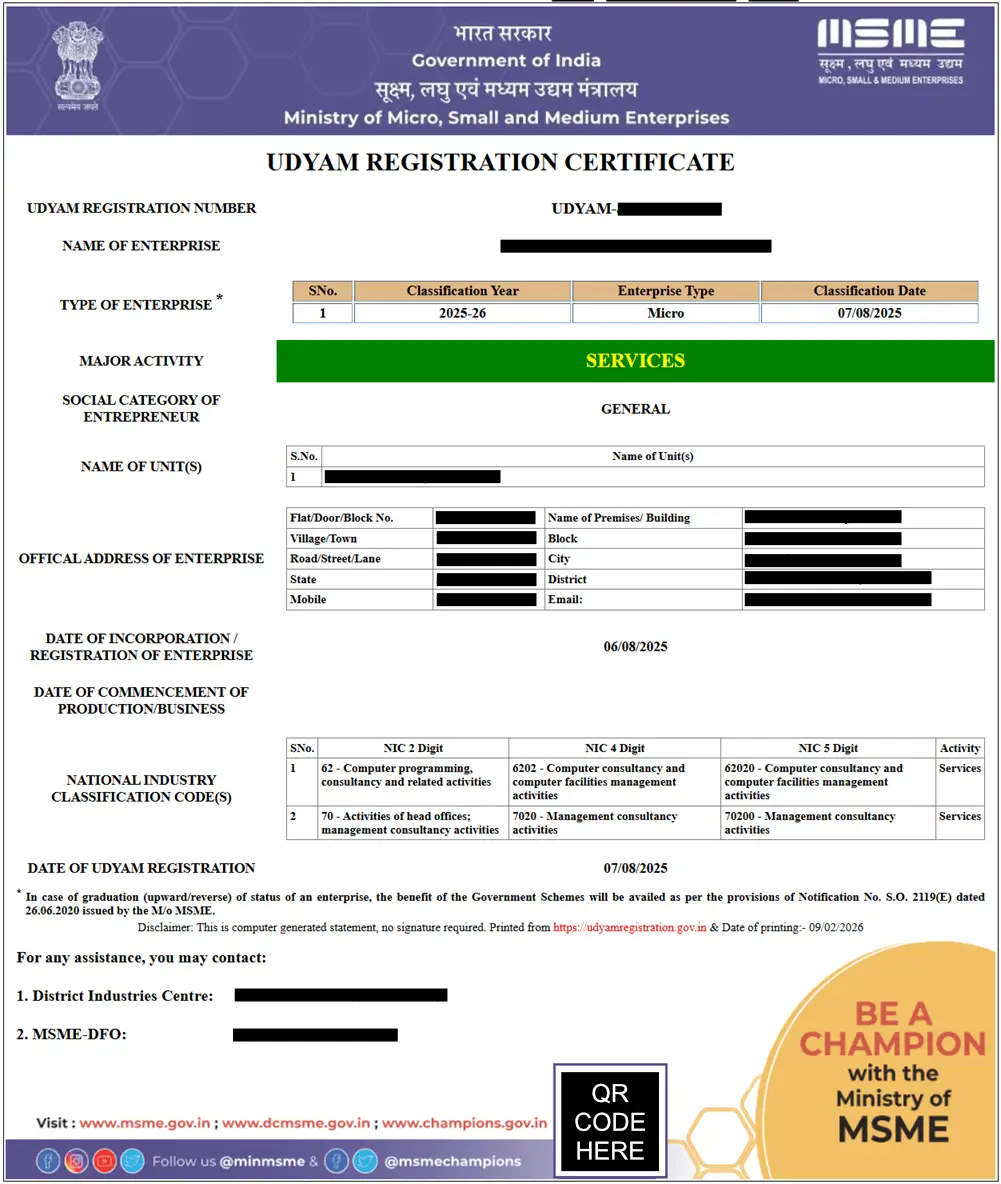
Udyam Registration Certificate Sample

Understand Download & Print Udyam Registration Certificate

The Udyam Registration Certificate is is an important document for MSMEs to access government schemes, subsidies, loans, and tenders. It is widely accepted by banks, financial institutions, and government departments across India. Since the certificate does not expire, you can Download and Print Udyam / MSME Registration Certificate anytime, if you lose the copy or need it for official use.


To download the certificate, visit the official Udyam portal or take the help of private consultancy like us. Just Enter your Udyam Registration Number and Registered Mobile Number & Email id in Udyam Download Form, our team will contact you and process your application through official portal. After User verification, your certificate will be send to your email in PDF format. You can save it on your device or take a printout for future use.

Why Download Udyam Registration Certificate?

Here are some reasons why yon need to download Udyam Certificate:

  • Required to apply for various MSME government schemes and subsidies.
  • Banks, insurance companies, and other financial institutions ask certificate as a proof of MSME registration.
  • Soft Copy needed for Current Account, bank loans and other financial applications.
  • Used for participation in government tenders.

Helpful Tips for Printing MSME Registration Certificate?

Follow these simple tips to safely print, store, and use your Udyam Certificate for official purposes

  • Print Certificate in High Quality

    Make sure to Print your Udyam Certificate using high quality settings. Use color printing to ensure that the government logo and QR code are clearly visible. Always print on A4 size paper with at least 80 GSM for a professional look.

  • Protect Certificate From Damage

    Consider laminating your printed certificate to protect it from any damage. Store the physical copy in a safe location along with other important business documents. Remember that you can always download and print a new copy anytime if required.

  • Keep a Digital Copy

    Always have a digital copy of udyam certificate for online use. The PDF format keeps the original layout and security features, and is commonly used for online document submissions in various platform and government portal.

Multiple Ways to Access Downloaded Udyam Certificate

Save a copy of Udyam Registration Certificate and Access it on Desktop, Mobile & Cloud

  • Desktop Access

    Save your Udyam Certificate PDF on your desktop for easy access. Store it in a secure location and use a PDF viewer to open and manage the file whenever needed.

  • Mobile Access

    Keep one copy of your Udyam Registration Certificate on your mobile device for quick access. Use a PDF viewer Application to open and share the certificate whenever required.

  • Cloud Access

    Upload your Certificate PDF to a secure cloud platform to access it anytime from any device. It can be used as a backup of your Udyam Certificate.

  • Common Issues to Avoid While Downloading Udyam Certificate

    While downloading your Udyam Registration Certificate, avoid these common issues for any delay or errors

    • Entering an incorrect Udyam Registration Number (URN)
    • Using a mobile number or email ID not linked with your registration details
    • Entering the wrong OTP or missing OTP verification
    • Network or browser issues during the download process
    • Typing errors in business or personal details

    Frequently Asked Questions (FAQs)

    How do I download my Udyam Registration Certificate?

    You can download your Udyam Registration Certificate by visiting theofficial Udyam Registration portal or private consultancy like us. .


    Since government process is lengthy and complicated. So It is advisable to take the help of our professionals.


    However, If you consult us, we charge a Small Consultancy Fee to provide Downloading support and run our business.

    How much time does it take to Download and Print Udyam Certificate?

    The Udyam Certificate download process usually take 5 - 10 minutes on the official udyam registration portal. Once you have submitted the details.

    Do I have to pay money to print or download the certificate?

    No, Downloading Udyam certificate is completely free on the official government portal.


    However, If you consult us, we charge a Small Consultancy Fee to provide Downloading support and run our business.

    I forgot my Udyam Registration Number. Can I still print it?

    No, you cannot print the certificate without Udyam Registration Number (URN) .


    Go to our Forgot URN page to recover your URN first.

    Does the printed certificate need a physical signature or stamp?

    No, you do not need to get it signed or stamped by any officer, the printed certificate is valid everywhere.


    The Udyam certificate also comes with a Unique QR Code for a digital verification.

    Can I Print Udyam Certificate from my mobile phone?

    Yes, you can print the certificate from your mobile device anytime.

    Can I Download Udyam Certificate multiple times?

    Yes, udyam certificate can be downloaded anytime when you need.

    What is the validity of MSME Registration Certificate?

    The MSME Registration Certificate comes with a lifetime validity. Once registered, there is no need for renewal.

    Chat With Us